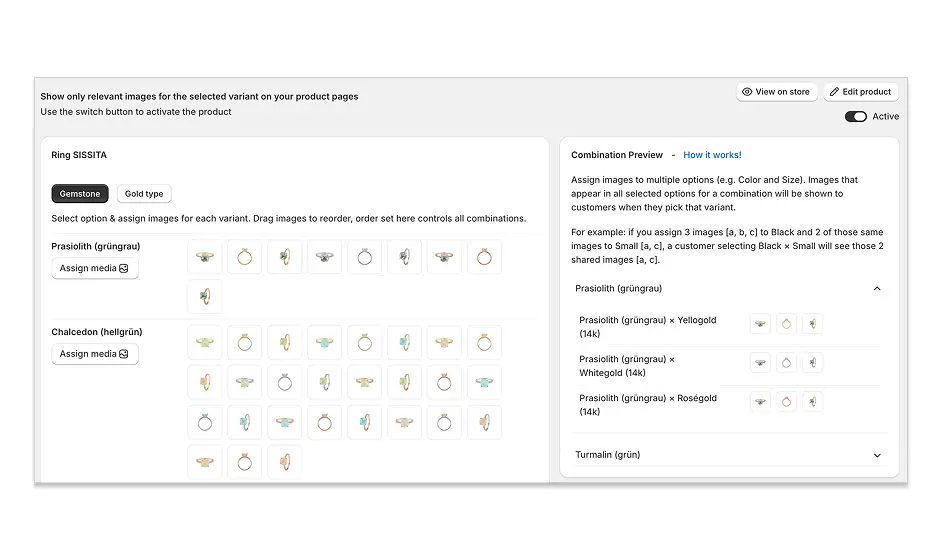
A variant image automator is a Shopify app that automatically shows the right product images when a customer switches between variants. Without one, Shopify displays all your product photos in a single mixed gallery, which confuses shoppers and drives up return rates. This post breaks down how these apps work, what features matter, and how the right setup can lift conversions and cut returns for good.
If you sell products in multiple colors, styles, or sizes, you already know this problem.
A customer lands on your product page and selects "Blue." But instead of seeing blue product photos, they're staring at a gallery full of red, green, and yellow images all mixed together. They scroll, get confused, and either guess or leave.
That confusion is costing you. According to Salsify's 2025 Consumer Research Report, 77% of shoppers say high-quality, relevant images and videos are important to their purchase decisions. When the wrong images show up for the wrong variant, you're failing that test before the customer even gets to checkout.
That's exactly the problem a variant image automator Shopify app is built to fix. This post covers what these apps actually do, how they work step by step, and what to look for when choosing one for your store.
What Is a Variant Image Automator Shopify App?
A variant image automator Shopify app automatically controls which product images appear on your page based on the variant a customer selects. When a shopper picks "Red," they see only red product photos. When they switch to "Blue," the gallery instantly updates to show only blue images. No manual toggling, no code, no confusion.
The "automator" part is the key word. The image switching happens on its own, without the merchant or the customer doing anything extra. You set it up once, and the app handles the rest automatically, every time, for every customer.
Why Shopify's Native Setup Isn't Enough
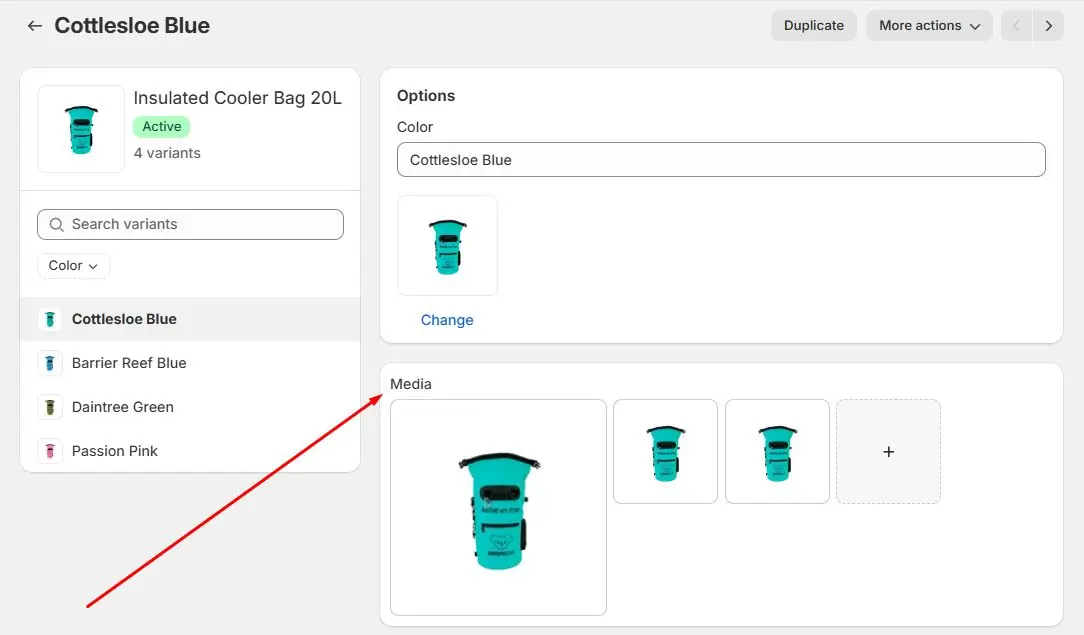
Shopify has made huge strides for merchants managing complex catalogs. It now supports up to 2,048 variants per product, which is a massive upgrade from the old 100-variant cap. But the image experience hasn't kept up.
Here's what you're working with out of the box. According to Shopify's own documentation, each variant supports only one assigned image. Product variants don't support other media types like 3D models or videos, and Shopify's native behavior is to display all product images in a single gallery regardless of which variant is selected.
That creates three real problems for stores with visually distinct variants:
You can't assign multiple photos to a single variant. If your blue version needs a front shot, a back shot, a lifestyle photo, and a detail close-up, Shopify natively can't do that.
All product images show up in one gallery at once. A customer selecting "Blue" still sees red, green, and every other colorway mixed in.
Shoppers have to scroll through everything manually. On mobile, where 72% of all ecommerce sales now come from, that's a frustrating experience that kills conversions.
For stores with simple products, this is fine. For stores selling apparel, footwear, furniture, accessories, or anything where the visual difference between variants actually matters to the buying decision, it's a serious problem.
How Does a Variant Image Automator Actually Work?
A variant image automator works in three steps: you install the app, assign multiple images to each variant inside the app's interface, and from that point the app automatically filters the gallery whenever a customer selects a variant.
Here's the full process in practice.
Step 1: Install the app. Most variant image automator apps, including Nova, work directly inside your Shopify admin. No code changes needed, and no theme edits required.
Step 2: Assign images to each variant. Inside the app, you select a variant (for example, "Blue") and assign all the images that belong to it. Front shot, back shot, lifestyle photo, detail close-up. Repeat for each variant. You can also assign images that apply to all variants, like a size chart or packaging shot, using bulk assign in one click.
Step 3: The app handles everything else. Once configured, every time a customer selects a variant on your product page, the gallery instantly filters to show only the images you assigned to that variant. Clean, fast, automatic.
That bulk assign feature is worth highlighting. For stores with large catalogs, assigning images manually to every variant would take days. Bulk assignment cuts that to minutes.
Does It Actually Help Conversions and Returns?
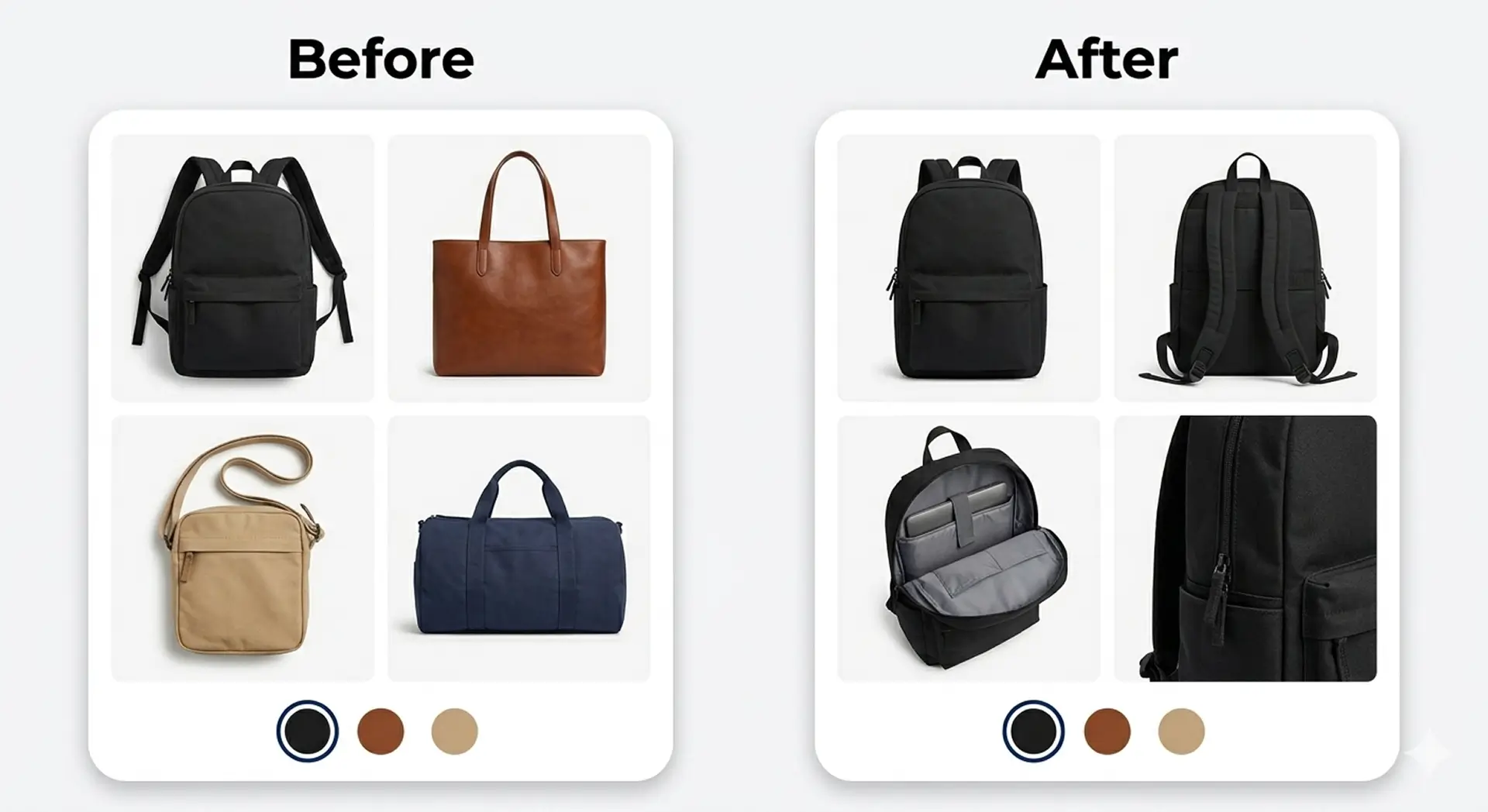
Yes. Showing the right images for the selected variant directly reduces returns and lifts conversion rates, and the data backs this up clearly.
On returns: 22% of products are returned because they look different from what the customer expected based on the product photos. When a shopper buys "Blue" but saw a gallery full of mixed colors, they're at higher risk of being disappointed when the product arrives. Filtered variant images eliminate that mismatch.
On conversions: Shopify found that products with enhanced visual content can increase conversion rates by up to 30% compared to products with lower-quality or less relevant images. Relevance matters as much as quality. The right image at the right moment builds the confidence that tips a browser into a buyer.
The average Shopify store converts 1.4% to 1.8% of visitors into customers. Stores in the top 20% exceed 3.2%. The gap between average and top performance often comes down to small friction points in the product page experience, and a mixed image gallery is one of the most common and fixable ones.
There's also a mobile angle worth noting. In a consumer survey, 59% of shoppers said that multiple images are crucial for their purchase decisions. On mobile, scrolling through 20 mixed photos to find the ones relevant to the variant you just selected is painful. A filtered gallery makes the experience clean and fast, which is exactly what mobile shoppers expect.
What to Look for in a Variant Image Automator App
Not all variant image automator apps are built the same. Here's what actually matters when you're evaluating options.
Multiple images per variant. This is the whole point. The app needs to support as many photos per variant as you need, not just one. Front, back, lifestyle, detail shots. Make sure there's no cap that would limit you.
Video and 3D model support. If your store uses product videos or 3D models to show how something works or looks from every angle, look for an app that supports these media types natively. Most basic apps only handle photos.
Works with your theme. Some apps are built for specific themes and break on anything custom. Look for one that's confirmed compatible with all Shopify themes, including Dawn, Horizon, and any custom-built theme, without needing code edits.
Bulk assignment. For any store with more than a handful of products, bulk assign is essential. It lets you apply images to multiple variants simultaneously instead of going one by one.
Page speed. A poorly built app loads scripts that slow down your product page. Since making a website just one second faster can lead to a 7% rise in conversions, this isn't a minor concern. Look for apps that are optimized not to add load time.
Free plan or trial. Most reputable apps offer a free plan or a trial period so you can test before committing. If an app doesn't offer this, that's worth questioning.
Who Actually Needs a Variant Image Automator?
If your variants look visually different from each other and customers need to see those differences to make a confident buying decision, you need this app. If your variants only differ in size or weight and all look identical, you probably don't.
Stores that get the most value from a variant image app include:
Fashion and apparel stores selling clothing in multiple colors, prints, or patterns. A customer choosing between a floral print and a solid black version needs to see each one clearly.
Footwear stores with different colorways per style. One shoe, four colorways, four sets of photos. A mixed gallery makes this impossible to shop.
Furniture and home decor stores offering products in different finishes or fabrics. Customers are making high-consideration purchases and need to see exactly what each finish looks like before buying.
Accessories brands selling products in color or material variants. Bags, jewelry, phone cases. The visual difference between variants is the whole purchasing decision.
Any store where what the product looks like changes depending on which variant the customer picks.
If your store falls into any of these categories, setting this up is one of the highest-impact improvements you can make to your product pages.
Try Nova Multiple Variant Images Free
Nova Multiple Variant Images is built specifically for Shopify stores that need clean, professional variant image galleries without the complexity.
With Nova, you can assign multiple images, videos, and 3D models to each variant, show only the relevant gallery automatically when a variant is selected, bulk assign media across your catalog in one click, and display images in stacked, columns, or slider with zoom layout. It works with all Shopify themes and page builders, no coding required.
With Nova, you can:
Assign multiple images, videos, and 3D models to each variant
Show only selected variant images automatically when a variant is picked
Bulk assign media to all variants in one click
Display a clean gallery in stacked, columns, or slider with zoom layout
Works with all Shopify themes and page builders, no coding needed
Plans start at $3.99/month. Free plan available, try it on 1 product with no plan required.
Install Nova Multiple Variant Images on the Shopify App Store →
Key Takeaways
A variant image automator Shopify app solves one of the most common and damaging problems on multi-variant product pages: showing the wrong images at the wrong time. The fix is straightforward. Install the app, assign images to each variant once, and the automation handles everything from that point on.
If your store sells products where the visual difference between variants matters to the customer, this is not a nice-to-have. It's a direct lever on your conversion rate and your return rate, and it requires zero ongoing effort after setup.
FAQ
What does a variant image automator Shopify app actually do?
A variant image automator Shopify app automatically filters the product image gallery based on the variant a customer selects. When someone clicks "Red," they see only red product photos. When they switch to "Blue," the gallery instantly updates. This removes confusion from product pages and makes it easier for customers to buy with confidence.
Does Shopify let you add multiple images per variant natively?
No. Shopify's native functionality allows only one image per variant, and product variants don't support other media types like 3D models or videos. For stores that need multiple photos per variant, front, back, lifestyle, and detail shots, a third-party variant image app is required.
Will a variant image automator slow down my Shopify store?
It depends on the app. Poorly built apps load extra scripts that can impact page speed, and since a one-second delay in load time can reduce conversions by up to 20% on mobile, this matters. Look for apps that load assets asynchronously and are built with performance in mind. Nova is optimized not to add extra load time to your product pages.
Can I use a variant image automator with videos and 3D models?
Yes, if you choose an app that supports these media types. Shopify's native variant system only handles images. Nova Multiple Variant Images supports photos, videos, and 3D models per variant, so you can give customers a complete visual experience for each option they're considering.
How much does a variant image automator app cost?
Pricing varies by app. Nova Multiple Variant Images starts at $3.99/month and includes a free plan for testing on one product with no credit card required. You can install Nova and try it free on the Shopify App Store before committing to a paid plan.