Last updated:
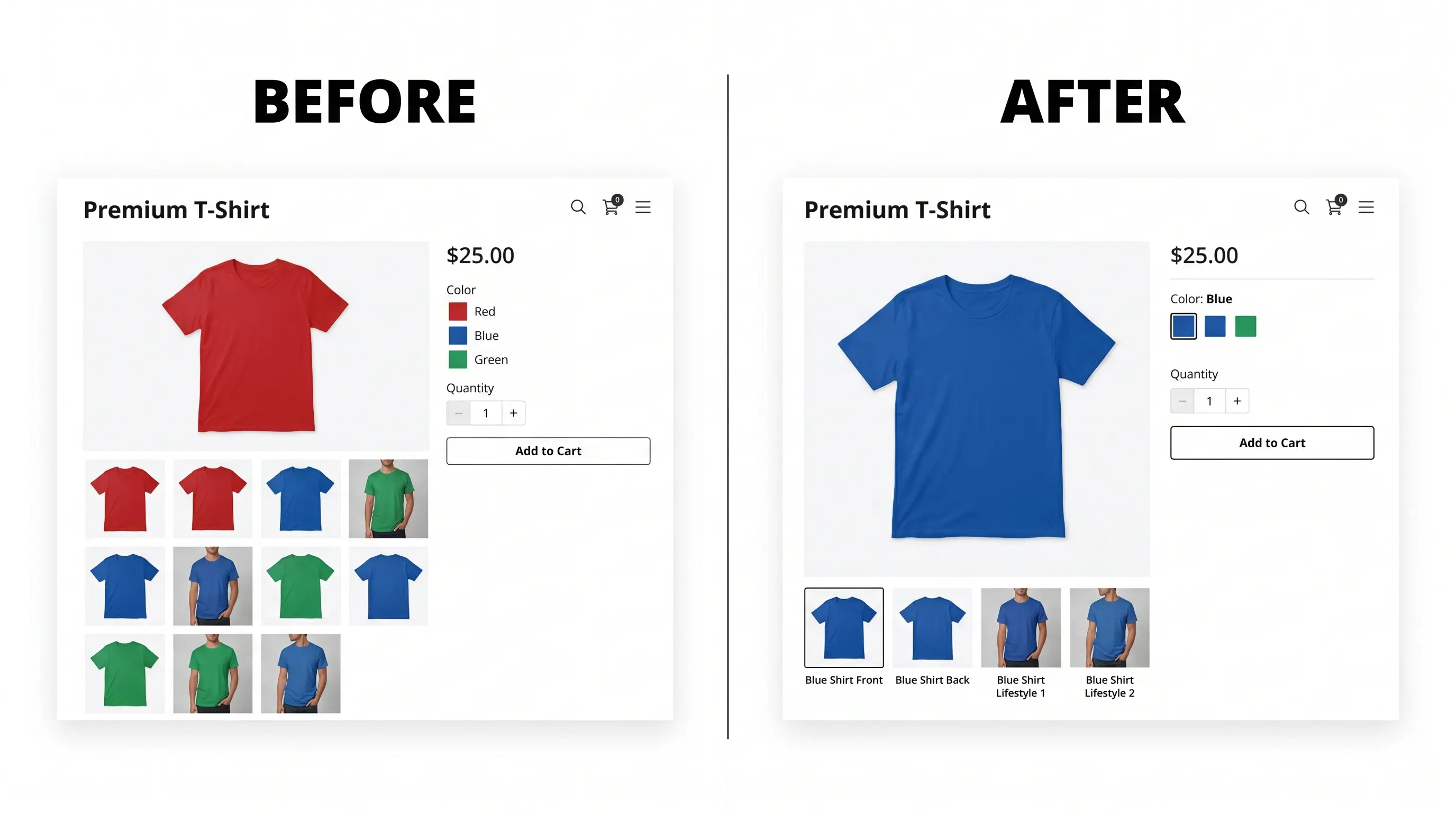
TL;DR: Shopify only supports one image per variant natively. To show multiple images, videos, or 3D models per variant, you need an app. This post compares the six best options in 2026: features, pricing, and who each one is actually built for, so you can pick the right one without wasting time testing apps that don’t fit your store.
Shopify’s native variant image system does one thing: assign one image per variant. That’s it. No gallery filtering, no videos, no 3D models, no bulk assignment.
For stores selling products where color, style, or material actually changes what the product looks like, that’s a real problem. 67% of online shoppers say image quality is the most important factor in their purchase decision. One image per variant isn’t enough.
There are six apps worth considering in 2026. They all solve the same core problem but they do it differently, work in different parts of your store, and cost very different amounts. Here’s the honest breakdown.
What to Look for in a Shopify Variant Image App
Before comparing apps, it’s worth knowing what actually matters. A good variant image app does three things: shows only the right images when a variant is selected, works wherever your products appear in your store, and doesn’t slow your store down.
Most apps only work on the product detail page. If your theme has a quick buy modal on collection pages, or a featured product section on your homepage, most variant image apps break or show the wrong images in those locations. That’s worth checking before you install anything.
Other things to look for: explicit image assignment so you stay in control, support for multiple variant option combinations like color and style together, video and 3D model support if you use rich media, drag and reorder to control image presentation, and pricing that scales fairly as your store grows.
How These Apps Actually Work
Not all variant image apps work the same way. There are two approaches.
Manual assignment means you explicitly choose which images belong to which variant inside the app. You stay in full control, nothing breaks if you reorganise your product gallery, and it handles multiple variant option combinations correctly.
Auto-grouping means the app detects image boundaries based on the order your images appear in Shopify. Zero manual setup, but if you ever reorder your gallery, groupings break. It also fails when products have multiple variant options combined, for example color and style at the same time.
Both work for simple setups. For stores with complex variant combinations, manual assignment is the only reliable option.
The 2026 Comparison
Feature | Nova | Rubik | SA Automator | Variant Image Wizard | VIM | Easy Variant |
|---|---|---|---|---|---|---|
Assignment method | Manual | Manual | Auto-group | Both | Manual | Auto-group |
Multiple images per variant | Yes | Yes | Yes | Yes | Yes | Yes |
Video + 3D per variant | Yes | Yes | No | No | No | No |
Built-in gallery | Yes | No | No | No | No | No |
Drag and reorder images | Yes | Yes | No | No | No | No |
Bulk assign common media | Yes | No | No | No | No | No |
Multiple variant options (color + style) | Yes | Yes | No | ⚠️ Manual only | Yes | No |
Quick buy modal | Yes | No | No | No | No | No |
Product page | Yes | Yes | Yes | Yes | Yes | Yes |
Collection page | Yes | No | No | No | No | No |
Homepage widget | Yes | No | No | No | No | No |
Multi-language | Yes | Yes | Yes | No | No | No |
Image swatches | Yes | Yes | No | Yes | No | No |
Custom theme support | Yes | Yes | Yes | Yes | Yes | No |
Live chat support | Yes | Yes | Yes | No | No | No |
Email support | Yes | Yes | Yes | Yes | Yes | Yes |
Built for Shopify | Yes | Yes | Yes | No | Yes | No |
Free plan | Yes | Yes | No | Yes | Yes | No |
Paid plan from | $9.99/mo | $25/mo | $14.90/mo* | $4.99/mo | $10/mo | $7.50/mo |
Rating | ⭐ 5.0 | ⭐ 5.0 | ⭐ 4.8 | ⭐ 4.7 | ⭐ 4.7 | ⭐ 5.0 |
*SA Automator pricing scales with your Shopify plan up to $99.90/mo on Plus.
Nova Variant Images & Swatch (Hey Jak)
Developer: Hey Jak | Built for Shopify: Yes | Free plan: Yes (1 product)
Rating: 5.0 (46 reviews) | Launched: February 16, 2026
Nova gives each Shopify variant its own images, videos and 3D models, and the gallery shows only what matches the selected option. You assign the media to variants yourself, and it is stored in Shopify’s native metafields.
Pick Nova if
You have a large catalog and want to auto assign and bulk assign media to many variants at once to cut setup time.
You want videos or 3D models per variant, not only photos.
Your products combine options, such as color and size.
You have a large catalog and want to bulk assign the same media to many variants at once.
You run a premium or custom theme or a page builder. Dawn, Horizon, Broadcast, Kalles, PageFly, GemPages, Shogun and Replo are listed, and theme setup is free on paid plans. Nothing is added to your theme code, because everything lives in the app.
You want a plugin for variant image swatches that can also hide unselected or unavailable variants.
You want an AI tool to auto assign multiple images per color variant while keeping your theme’s variant image gallery with zoom and videos.
Your products have many variants or use bundles. Nova supports Shopify’s new limit of 2,048 variants per product, and product bundles.
Skip Nova if
You need color-circle swatches. Nova does image swatches only.
Review volume decides it for you. Nova launched in February 2026 and has far fewer reviews than Rubik or SA.
Plans
Free for 1 product. Standard is $9.99/mo or $100/year (50 products, 3-day trial). Pro is $19.99/mo or $200/year (130 products). Premium is $49.99/mo or $479.88/year (1,000 products). Enterprise is $69.99/mo or $600/year (unlimited products).
Reviewers say
Rated 5.0 from 46 reviews. Merchants mention easy setup, fast support replies, and an interface they find smoother and cheaper than Rubik’s. One merchant configured more than 4,000 products with Nova using their internal tool.
Rubik Variant Images & Swatch (Craftshift)
Developer: Craftshift | Built for Shopify: Yes | Free plan: Yes (1 product)
Rubik assigns multiple images, videos and 3D models to each variant and filters the gallery to the selected option, while keeping your theme’s own gallery. You can assign media manually, with AI-assisted matching, or with bulk grouping based on gallery order.
Pick Rubik if
You want AI visual matching that assigns photos to variants for you, with a monthly AI image allowance on every plan.
You want variant images and color or image swatches in one app.
You want a product’s own variant swatches on collection and search cards (added in May 2026).
You want shared images that appear on several variants without duplicating them.
You are on Shopify Advanced or Plus and prefer pricing based on product count, not your Shopify plan.
You want wide theme coverage. The developer states support for 350+ themes and seven page builders.
Skip Rubik if
You run a small store. The first paid plan is $25/mo for 100 products.
You want swatches that link separate products on collection pages. That needs a separate app, Rubik Combined Listings.
You already use another swatch selector app. Rubik’s own guide warns that competing swatch selectors can conflict, and AI matches should be reviewed before you save.
Plans
Free for 1 product, with a small monthly AI image allowance. Starter is $25/mo or $200/year (100 products). Advanced is $50/mo or $400/year (1,000 products). Premium is $75/mo or $600/year (unlimited products).
Reviewers say
Rated 5.0 from 476 reviews. Most praise ease of use and the support team. Two lower ratings stand out. A 1-star review says the theme integration removed product options and variants from some best-selling products on a live store. A 2-star review says the free plan covers only one product before a paid plan is required.
SA Variant Image Automator (StarApps)
Developer: StarApps Studio | Built for Shopify: Yes | Free plan: Dev, staff and trial stores only
SA groups your product images into variant sets automatically, based on the order they appear in your Shopify product gallery. There is no manual tagging inside the app. It keeps your theme’s own gallery layout.
Pick SA if
Review volume and track record matter most to you. SA has been around since 2017 and has the most reviews of the six apps.
Your product images are already ordered by variant and the order rarely changes.
You want to keep your theme’s existing gallery, including zoom, video and 3D models.
You are switching from another variant image app. The listing offers migration from Rubik, VSlide, Variant Image Wizard and SC Product Options.
You are on Shopify Basic, where the entry price is competitive.
Skip SA if
You reorder or replace gallery images often. Grouping follows image order, so changes can break the groups.
Your products combine options such as color and style. The listing mentions advanced variant options, but order-based grouping is harder to keep right with combined options, so test one product first.
You are on Advanced or Plus. Pricing follows your Shopify plan, up to $99.90/mo on Plus.
You run a custom theme. Some reviews report compatibility problems.
Plans
Pricing follows your Shopify plan: $14.90/mo on Basic, $29.90 on Grow, $49.90 on Advanced and $99.90 on Plus, with a 30-day free trial. The free plan is for development, staff and trial stores only.
Reviewers say
Rated 4.8 from 757 reviews. Most praise the support team’s speed. A minority report slow support, billing confusion or problems after Shopify updates.
Variant Image Wizard + Swatch (ProductWiz)
Developer: ProductWiz | Built for Shopify: No | Free plan: Yes
Variant Image Wizard combines variant images with swatches. You can show image and color swatches, buttons or dropdowns, and the listing says it works with videos and 3D models. It offers both automatic and manual image assignment.
Pick Variant Image Wizard if
Price decides it. It has the lowest entry price of the six apps, from $4.99/mo.
You want swatches and variant images in one budget app.
You use one of Shopify’s free themes, which is what the lower plans support.
You want variant image bulk edit, which is on the top plan.
Skip Variant Image Wizard if
You use a paid or premium theme. The free and Starter plans work only with Shopify’s free themes, so you need the top plan.
You want the Built for Shopify badge. This app doesn’t have it.
You have a large catalog on the free plan. It covers variant images for up to 5 products.
You want an app that lives inside the Shopify admin, or the Built for Shopify badge. In our October 2026 testing this app opened as a separate external interface that felt dated and harder to follow.
Plans
Free for up to 5 products, free Shopify themes only. Starter is $4.99/mo (unlimited products, free themes only, 14-day trial). Pro is $7.99/mo (bulk edit, all themes, 14-day trial).
Reviewers say
Rated 4.7 from 225 reviews. Merchants praise the developer’s quick bug fixes and custom coding help. Some reviews report theme compatibility problems, and one review disputes charges after uninstalling.
VIM: Variant Image Module (RGD)
Developer: RGD | Built for Shopify: Yes | Free plan: Yes
VIM replaces your theme’s product gallery with its own variant gallery, which you can customize as a slider or a grid. You assign each image to variant options, including more than one option at once, such as color and size. Images that aren’t assigned to any variant show for every variant.
Pick VIM if
You want a customizable replacement gallery instead of your theme’s own gallery.
Your images need to follow combined options, such as Blue/Large with different photos from Blue/Small.
Only a few of your products use multiple photos per variant. Reviewers say the free plan covers that case.
You want the Built for Shopify badge, which VIM has.
Skip VIM if
You want to keep your theme’s own gallery, zoom and layout. VIM replaces them.
You need videos, 3D models or swatches. The listing doesn’t mention them.
You want a large review history. VIM has about 22 reviews.
Plans
Free plan available, with a free trial. Paid plans add features such as variant descriptions. Current prices are on the listing.
Reviewers say
Rated about 4.9 from about 22 reviews. Merchants call it easy and handy for grouping images by variant, and one review describes the developer fixing a mobile gallery issue with a code snippet.
Easy Variant Images (Spice Gems)
Developer: Spice Gems | Built for Shopify: No | Free plan: No
Easy Variant Images does one job. You attach multiple images to each variant, and the product page shows only the images for the selected variant.
Pick Easy Variant Images if
You want a single-purpose app with nothing else to configure.
You want every feature included on every plan, with only the price changing by Shopify plan.
You are on Shopify Basic, where the price starts at $7.50/mo.
You are happy to add swatches with a separate app. The developer, Spice Gems, makes one, and one reviewer uses the two together.
Skip Easy Variant Images if
You need videos, 3D models, swatches, bulk assign or AI assignment. The listing names only two features.
You want a free plan. There is none, only a 21-day free trial.
You are on Advanced or Plus. The price rises to $14.50/mo or $19.50/mo with your Shopify plan.
You want the Built for Shopify badge. This app doesn’t have it.
Plans
No free plan. 21-day free trial. All features are included on every plan: $7.50/mo for Basic stores, $14.50/mo for Shopify and Advanced stores, $19.50/mo for Shopify Plus stores.
Reviewers say
Rated 5.0 from about 60 reviews. Merchants call it easy to set up and praise the support team.
Which App Is Right for Your Store
If you need variant images to work everywhere including the product page, quick buy, collection page, and homepage, Nova is the only option. No other app in this list covers all four.
If you have products with multiple variant option combinations like color and style together, only Nova and Rubik handle this correctly. Auto-grouping apps will fail in this scenario.
If you need swatches bundled in and budget isn’t the concern, Rubik is the best-built option for that use case.
If your product images are already perfectly ordered, you only have single variant options, and you want zero setup, SA Automator’s auto-grouping will save you time. Just be aware of how pricing scales.
For everyone else, Nova has a free plan that lets you test on one product before committing to anything.
Install Nova Variant Images & Swatch
FAQ
What is the best Shopify app for multiple variant images?
Nova Variant Images & Swatch is the most complete option for most stores. It’s the only app that works across the product page, quick buy modal, collection page, and homepage widgets. It includes bulk assign, drag and reorder, a built-in gallery, video and 3D support, custom theme support, and starts at $9.99/mo. It holds a 5.0 rating and is Built for Shopify certified.
Do I need an app to show multiple images per variant in Shopify?
Yes. Shopify’s native system supports one image per variant only. There’s no workaround or setting to change this, it’s a platform limit. A third-party app is the only way to show multiple images, videos, or 3D models per variant with automatic gallery filtering.
What is the difference between manual assignment and auto-grouping?
Manual assignment means you explicitly assign images to each variant inside the app. Full control, nothing breaks if you reorder your gallery, and it supports multiple variant option combinations. Auto-grouping detects variant image sets based on image order in Shopify. Faster to set up but sensitive to image ordering and fails with combined variant options.
Which variant image apps are Built for Shopify certified?
Nova, Rubik, SA Variant Image Automator, and VIM all hold the Built for Shopify badge. Variant Image Wizard and Easy Variant Images do not.
Does the variant image app work on quick buy and collection pages?
Most apps only work on the product detail page. Nova is the only app in this category that supports quick buy modals, collection pages, and homepage featured product widgets.